All posts by Trevor Larkum

Cheap cars for sale

Cheap Cars for Sale

Cheap Cars for Sale

Like lots of people we are always looking for cheap cars for sale/cheap cars to buy. This is because so many of us spend a considerable amount of our income on our car and are naturally interested in saving money. However, it is still relatively uncommon for people to consider getting an electric car. This is despite them being notoriously cheap to run, and therefore good value when considered in terms of the ‘total cost of ownership‘. For example, what other new cars can you buy from £200 per month including fuel? That’s certainly worth considering if you’re looking for cheap cars to buy.

Cheap cars for sale
Cheap cars for sale

Most people’s hesitation with going electric is probably because they assume they’ll be expensive to buy. To be fair, they do tend to be more expensive than an equivalent fossil-fuelled car to purchase. However, it’s not true across the board. Electric cars vary in price all the time and if you’re looking for cheap cars to buy there are bargains to be had (especially on car leasing deals).

Nissan Leaf and Renault ZOE: Cheap Cars to Buy

It’s interesting to note, for example, that the Renault-Nissan alliance seems to price its Renault and Nissan vehicles alternately high and low. This means that when one is expensive the other is cheap. Of course, this may be an accidental result of launch timing. When the Leaf 30kWh launched it was expensive and the ZOE 22kWh was a cheap alternative. Then the ZOE ZE40 launched at a high price. The Leaf had been around for a while so then it looked like the cheap alternative.

Renault ZOE and Nissan Leaf - cheap cars for sale
Renault ZOE and Nissan Leaf

Currently the Leaf is sells at very low prices, partly because the long range ZOE has the spotlight. It is probably also in part because the market knows there’s a long range Leaf on the way. If you’re wanting a cheap car for sale then the current Leaf is your best bet.

The new Leaf will launch in September and should be available to buy by the end of the year. If it follows the usual trend it will initially be at a higher price. Suddenly the ZOE will again look like the cheap alternative.

Both are great cars though and, like all electric cars, are considerably cheaper to run than their combustion equivalents. Please use our ‘Total Cost of Ownership’ calculator if you’re looking for cheap cars to buy and you want to know how much money you could save.

Cheap Cars for Sale Near Me

If you’re specifically searching for ‘cheap cars for sale near me’ then note that we have bases and electric car suppliers in Milton Keynes, St Albans, London, Northampton, Bedford, Cannock, Leicester and Liverpool. This allows us to supply all around the Midlands (including London, Cambridge, Luton, Oxford, Rugby, Kettering, Coventry, Nottingham and Birmingham). However we can deliver all around the country – just contact us for details.

Fuel Included BMW i3 on static display (Image: T. Larkum)

Electric Car Day – Focus on BMW i3

The car that generated the most interest at our test drive event recently was undoubtedly the BMW i3. This is not surprising as the i3 is arguably the most advanced car in production at the moment, being both electric and constructed of carbon fibre. Certainly it was the car that was booked up fastest for test drives.

Fuel Included BMW i3 on static display (Image: T. Larkum)

As before we had our own i3 on static display so visitors could look around it. In addition we had an i3 available for taking on test drives. We took a couple of brief videos of this one, the first one is a walkaround.

The second video demonstrates how quiet the i3 is as it leaves on a test drive.

Our thanks go to Rick of Wollaston BMW for bringing the car along and conducting the test drives.

James of Digital Group Media awaits his turn in the Leaf (Image: T. Larkum)

Electric Car Day – Focus on Nissan

The Nissan vehicles at our Electric Car Day were the Leaf Tekna electric car and the e-NV200 electric van. We’ve sold lots of Leafs but it was nice to see the more unusual e-NV200 ‘in the flesh’; we can supply these too so don’t hesitate to ask us if you want to know more.

James of Digital Group Media awaits his turn in the Leaf (Image: T. Larkum)

Below is a quick video of the e-NV200 taken during the event.

Our thanks to Darren and Chris from Glyn Hopkin for bringing the Nissan vehicles.

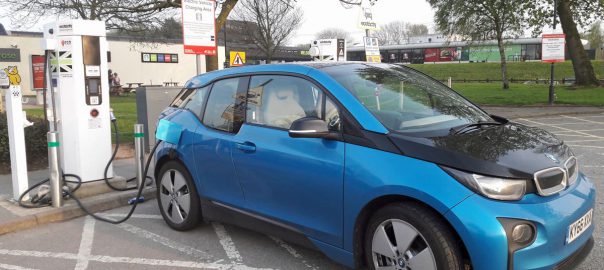
Our BMW i3 on charge at Corley Services (Image: T. Larkum)

Rapid Charging with an Ecotricity Charge Point

Rapid Charging on the Motorway

Our BMW i3 on charge at Corley Services (Image: T. Larkum)

Once you’ve had an electric car for a short while you’ll want to venture beyond its initial range and you can only do that by charging away from home. The most popular method is to use one of the network of Ecotricity rapid chargers, their ‘Electric Highway‘; there is at least one located at virtually all service stations on the UK motorway network.

In advance you need to have installed the Electric Highway smartphone app (available for Apple and Android devices) and set up an account with Ecotricity to allow you to use it. Ecotricity home customers get 52 free uses per year, otherwise the charge is £6 per half hour charge.


Step-by-Step Guide

Here is your guide to charging your electric car at an Ecotricity rapid charger:

1. On arrival, park up so the required cable can reach the charge socket on your car. Typically that means facing forward if your car has the charge point in the nose (e.g. the Nissan Leaf, Renault ZOE or Kia Soul) but reversing in if the charge point is near the rear (e.g. BMW i3, Mitsubishi Outlander, Hyundai IONIQ or Tesla Model S).

Rapid Charging Step 1: Access the Rapid Charger (Image: T. Larkum)

2. Get out of the car and check the screen on the rapid charger to confirm it’s working. Assuming the charge point is not already in use, the rapid charger will show a screen saying ‘Welcome! To charge your car, use the Electric Highway smartphone app’ or ‘Welcome! Select the correct charger for your vehicle’.

Rapid Charging Step 2: Welcome Screen (Image: T. Larkum)

3. Start the Electric Highway app on your phone. If it has been correctly setup it will show your car type at the top. The screen will say ‘What would you like to do?’ with two big green buttons labelled ‘Charge: charge your vehicle now’ and ‘Find pumps: find compatible pumps’.

Rapid Charging Step 3: Choose to Charge (Image: T. Larkum)

4. Press the ‘Charge’ button. The screen will change to say ‘Charging your car’. Press the ‘Get Started’ button.

Rapid Charging Step 4: Get Started (Image: T. Larkum)

5. The screen will change to say ‘To start, scan the pump’s QR code or enter the pump ID’. Here ‘pump’ is Ecotricity’s term for a rapid charge point. For simplicity we’ll choose the latter – press the ‘Enter pump ID manually’ button.

Rapid Charging Step 5: Identify the ‘Pump’ (Image: T. Larkum)

6. This will bring up a box to enter the pump identification number; selecting in this box will bring up your ’phone keyboard. Type in the four digit number as written below the screen on the charge point.

Rapid Charging Step 6: Enter the Pump Number (Image: T. Larkum)

7. The app will look this up and specify the location of the rapid charger with that number. If the number matches your location press ‘YES’.

Rapid Charging Step 7: Identify the Pump Location (Image: T. Larkum)

8. The screen will change to allow you to select the appropriate cable and connector for rapid charging your car. This is essentially straightforward: the Renault ZOE uses AC rapid, the Leaf, Outlander and Kia Soul use CHAdeMO and most others use CCS. You should know the connector type for your car, and the app will also exclude the ones it believes are incompatible. However, you should be aware that most cars can use the AC at low speeds as well as the DC at high speeds and so you may accidentally use AC but find your car charges only very slowly. In other words, use CCS and CHAdeMO in preference to AC unless you have a ZOE.

Rapid Charging Step 8: Select the Connector (Image: T. Larkum)

9. At this point control of the charging moves from the app to the charge point itself. Once initialised the charge point screen will show ‘Connection: connect your vehicle’.

Rapid Charging Step 9: Connect to the Car (Image: T. Larkum)

10. Plug the connector into the car, remembering to remove the secondary dust cover if you have a CCS socket. So long as the car is set to charge (i.e. you don’t have the charge timing override set) the car and charge point will ‘negotiate’ the fast charge they can both support, and charging can begin. The screen will show ‘Initialization: Please wait whilst your vehicle connects to the charge point’ and will highlight the charge point going through a number of check steps: Start communication, Isolation check, Precharging, Charging.

Rapid Charging Step 10: Initialization (Image: T. Larkum)

11. At this point charging starts, and you can usually hear the distinctive high pitched whine of rapid charging underway.

Rapid Charging Step 11: Car is Charging (Image: T. Larkum)

Monitoring the charge progress, and ending the charging session, are covered in Part 2.

Hyundai IONIQ Electric Lease Prices


Warning: preg_match(): Compilation failed: invalid range in character class at offset 4 in C:\inetpub\vhosts\fuelincluded.com\httpdocs\wp-content\plugins\maxbuttons\assets\libraries\simplehtmldom\simple_html_dom.php on line 1389

Warning: preg_match_all(): Compilation failed: invalid range in character class at offset 4 in C:\inetpub\vhosts\fuelincluded.com\httpdocs\wp-content\plugins\maxbuttons\assets\libraries\simplehtmldom\simple_html_dom.php on line 694

Warning: foreach() argument must be of type array|object, null given in C:\inetpub\vhosts\fuelincluded.com\httpdocs\wp-content\plugins\maxbuttons\assets\libraries\simplehtmldom\simple_html_dom.php on line 701

Warning: preg_match_all(): Compilation failed: invalid range in character class at offset 4 in C:\inetpub\vhosts\fuelincluded.com\httpdocs\wp-content\plugins\maxbuttons\assets\libraries\simplehtmldom\simple_html_dom.php on line 694

Warning: foreach() argument must be of type array|object, null given in C:\inetpub\vhosts\fuelincluded.com\httpdocs\wp-content\plugins\maxbuttons\assets\libraries\simplehtmldom\simple_html_dom.php on line 701

Fatal error: Uncaught Error: Attempt to assign property "href" on array in C:\inetpub\vhosts\fuelincluded.com\httpdocs\wp-content\plugins\maxbuttons\blocks\basic.php:171 Stack trace: #0 C:\inetpub\vhosts\fuelincluded.com\httpdocs\wp-content\plugins\maxbuttons\classes\button.php(382): MaxButtons\basicBlock->parse_button() #1 C:\inetpub\vhosts\fuelincluded.com\httpdocs\wp-content\plugins\maxbuttons\classes\button.php(476): MaxButtons\maxButton->parse_button() #2 C:\inetpub\vhosts\fuelincluded.com\httpdocs\wp-content\plugins\maxbuttons\classes\button.php(903): MaxButtons\maxButton->display() #3 C:\inetpub\vhosts\fuelincluded.com\httpdocs\wp-content\plugins\maxbuttons\classes\maxbuttons-class.php(525): MaxButtons\maxButton->shortcode() #4 C:\inetpub\vhosts\fuelincluded.com\httpdocs\wp-includes\shortcodes.php(434): MaxButtons\maxButtonsPlugin->shortcode() #5 [internal function]: do_shortcode_tag() #6 C:\inetpub\vhosts\fuelincluded.com\httpdocs\wp-includes\shortcodes.php(273): preg_replace_callback() #7 C:\inetpub\vhosts\fuelincluded.com\httpdocs\wp-includes\class-wp-hook.php(324): do_shortcode() #8 C:\inetpub\vhosts\fuelincluded.com\httpdocs\wp-includes\plugin.php(205): WP_Hook->apply_filters() #9 C:\inetpub\vhosts\fuelincluded.com\httpdocs\wp-includes\post-template.php(256): apply_filters() #10 C:\inetpub\vhosts\fuelincluded.com\httpdocs\wp-content\themes\twentythirteen\content.php(43): the_content() #11 C:\inetpub\vhosts\fuelincluded.com\httpdocs\wp-includes\template.php(812): require('...') #12 C:\inetpub\vhosts\fuelincluded.com\httpdocs\wp-includes\template.php(745): load_template() #13 C:\inetpub\vhosts\fuelincluded.com\httpdocs\wp-includes\general-template.php(206): locate_template() #14 C:\inetpub\vhosts\fuelincluded.com\httpdocs\wp-content\themes\twentythirteen\author.php(49): get_template_part() #15 C:\inetpub\vhosts\fuelincluded.com\httpdocs\wp-includes\template-loader.php(106): include('...') #16 C:\inetpub\vhosts\fuelincluded.com\httpdocs\wp-blog-header.php(19): require_once('...') #17 C:\inetpub\vhosts\fuelincluded.com\httpdocs\index.php(17): require('...') #18 {main} thrown in C:\inetpub\vhosts\fuelincluded.com\httpdocs\wp-content\plugins\maxbuttons\blocks\basic.php on line 171